 PomoFocus
The problem it solves
You sit down to work on the big thing, and an hour later you've answered email, checked the news and reorganized your desktop. The big thing is still sitting there.
The Pomodoro method is the simplest focus trick I know that actually works. Work on one thing for a short stretch, then take a real break. After a few rounds, take a longer one. A small, definite block is much easier to start than an open-ended task, and the breaks keep the afternoon from collapsing.
How it works
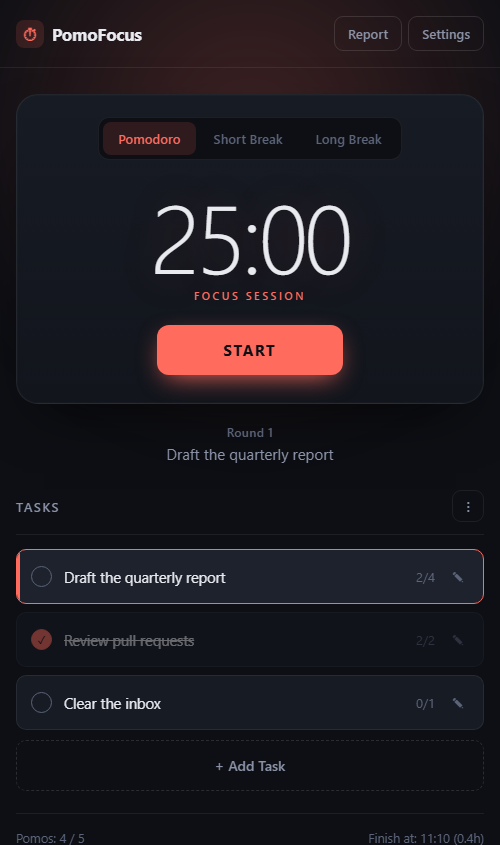
- Add a task. What you're working on, and how many pomodoros you think it'll take.
- Press START and work on that one thing until the alarm rings. The spacebar starts and pauses too.
- Take the break. Stand up. Get away from the screen. The timer switches to a short break on its own.
- Repeat. After every fourth pomodoro you get a long break. The summary bar shows how many are left and what time you'll finish.
Make it fit how you work
The defaults are 25 minutes of focus, 5 minute short breaks and 15 minute long breaks. Change any of them in Settings, along with how often the long break comes around.
You can have breaks and pomodoros start on their own, pick an alarm (bell, beep, chime or none), set the volume and how many times it repeats, and turn on a quiet tick while the timer runs. There's a light mode if dark isn't your thing, and desktop notifications so you hear about it even when the tab is hidden.
On Windows, you can also start, pause or skip from any program with a global hotkey. That part needs my free HotkeyBridge helper running on your PC.
See your patterns
The Report shows your focus hours today, this week, and your day streak, with a bar chart for the last week or month. You can export your history too.
Don't judge a single day by it. The report is for spotting patterns over weeks: which days you get real work done, and which ones slip away.
Why I ask for your email
Not because of your tasks. PomoFocus has no server side at all: your tasks, settings and history are saved in this browser on this device, and nothing about them is sent to me.
The email lets me know who's using the tool, and I might send you a note now and then about other free tools I build. I will never sell or give your email to anyone else.
Questions people ask
Is it free?
Yes. No account, no subscription, no ads.
Can I change the timer lengths?
Yes. Each timer can be set from 1 to 180 minutes in Settings, and you choose how many pomodoros come before a long break.
Does it work offline?
Yes. Once it has loaded, it keeps working without a connection. You can also install it to your home screen or desktop.
Will my history follow me to another device?
No. It's stored in this browser on this device. Clearing your browser data erases it.
Does it work on my phone?
Yes, it runs in a phone browser. The global hotkeys are the only part that's Windows only.